
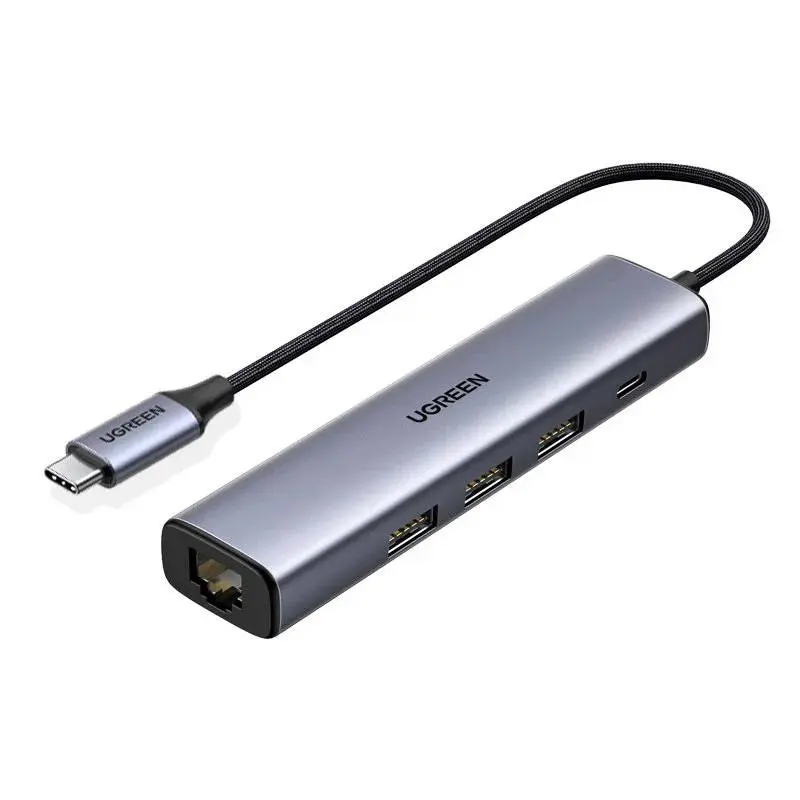
Network adapters for devices without a built-in LAN port — from USB-C to RJ45 Gigabit for MacBook Air/Pro and iPad Pro to USB-A to Gigabit adapters for older laptops. We stock 1 GbE models for everyday internet and office work, 2.5 GbE adapters for streaming, 4K editing and faster NAS access, plus compact travel dongles in aluminium housings. Auto-MDIX, Wake-on-LAN and plug-and-play on macOS, iPadOS, Windows and ChromeOS are standard. Shipped from our Basel warehouse — same-day dispatch by 4 pm, free above CHF 15, 2-year Swiss warranty. Invoice payment available (credit check by Powerpay).


Ugreen


Ugreen
For browsing, office, video calls and 4K streaming, 1 GbE is plenty — Netflix 4K only uses 25 Mbps. 2.5 GbE makes sense for local NAS transfers or fibre above 1 Gbps.
Yes — iPad Pro/Air with USB-C from 2018 onwards and iPad 10 detect Realtek and ASIX adapters automatically. Ideal for stable cloud uploads without Wi-Fi drops.
Auto-MDIX means the adapter automatically detects whether a patch or crossover cable is in use and adapts. Cable type does not matter.
Yes, many adapters support WoL — enable it both in BIOS and the OS driver.
Three reasons: USB 2.0 port on the host, Cat 5 cable instead of Cat 5e/6, or older switch limited to 100 Mbps.
When your MacBook, iPad or tablet has no Ethernet port, three criteria matter: plug type, speed and housing. USB-C is the standard on MacBook M1–M4 and iPad Pro/Air — USB-C adapters plug in directly. USB-A fits pre-2018 laptops and desktops without USB-C. For most users 1 GbE (1000 Mbps) is plenty — more than most Swiss fibre plans deliver anyway. If you run a NAS with 2.5 GbE or a multi-gig modem, the jump to 2.5 GbE pays off.
A USB 2.0 port limits throughput to about 280 Mbps — true Gigabit needs USB 3.0 (USB 3.2 Gen 1, 5 Gbps) or better. 2.5 GbE adapters require USB 3.0+ on the host. The LAN cable matters too — Cat 5e is fine for 1 GbE, for 2.5 GbE we recommend Cat 6 or Cat 6a. Thunderbolt 4 docks bundle Ethernet, DisplayPort and a USB hub in one — see our docking stations.
All popular adapters are plug-and-play: macOS 11+, iPadOS 16+, Windows 10/11, ChromeOS and most Linux distros detect the Realtek or ASIX chip automatically. On iPad Pro/Air with USB-C, a wired connection delivers noticeably lower latency for streaming or cloud gaming. MacBook M-series only has USB-C/Thunderbolt — the adapter plugs in directly.
Aluminium housings dissipate heat passively and stay cool even under 24/7 streaming. A USB-C Gigabit adapter typically draws 0.5–1 W — 2.5 GbE adapters about 1.5 W — still less than an LED bulb. Recyclable aluminium instead of plastic saves resources and supports take-back via our RPD recycling programme.
For browsing, office, video calls and 4K streaming, 1 GbE is plenty — Netflix 4K only uses 25 Mbps. 2.5 GbE makes sense for local NAS transfers or fibre above 1 Gbps.
Yes — iPad Pro/Air with USB-C from 2018 onwards and iPad 10 detect Realtek/ASIX adapters automatically.
Auto-MDIX means the adapter automatically detects patch or crossover cables and adapts — cable type does not matter.
Yes, many adapters support WoL — enable it both in BIOS and the OS driver.
Three reasons: USB 2.0 port on the host, Cat 5 cable instead of Cat 5e/6, or older switch limited to 100 Mbps.
Shipped from our Basel warehouse — A-Post 1–2 working days, express next business day or free pickup in Basel, Aarau or Olten. 2 years Swiss warranty on all products, 14-day returns. Invoice payment available (credit check by Powerpay), best-price guarantee CH. Aluminium housings are fully recyclable — return old adapters, hubs and storage media via our RPD recycling programme. Visit one of our stores for personal advice — bring your laptop or iPad and we will find the right accessory together.